How CrushThisCourse works
Training tells you what you can do. CrushThisCourse is Race Decision Intelligence: it shows how your race could play out, lets you pressure-test the decisions that change it, and helps you settle on a strategy before race day. Here is the whole flow, for athletes racing their own plan and for coaches.
Scan to download the app
Decision intelligence, not artificial intelligence
CrushThisCourse does not use generative AI to write your strategy. It combines real historical race data with statistical modeling for your competitive context, and a deterministic, physics-based optimizer for your bike power plan — not a language model guessing at your race.
For athletes
Predict, pressure-test, decide. The bike power plan and the .fit export are optional tools inside that loop, not the point of it.
- 1
Predict your race
- Go to the Race Simulator (/sim).
- Under Adjust your plan, use the Race field to search for your race. It is a searchable picker, not a plain dropdown, so typing a state abbreviation like FL or a nickname like IMFL works too.
- Set your Age Group from the dropdown next to it.
- Set your Target from the dropdown: Win (1st), Podium (Top 3), Top 5, or Top 10.
- The Swim, T1, Bike, T2, and Run sliders start from default splits for the race you picked. Set them to your real or goal splits. The page recalculates as you move them; there is no submit button.
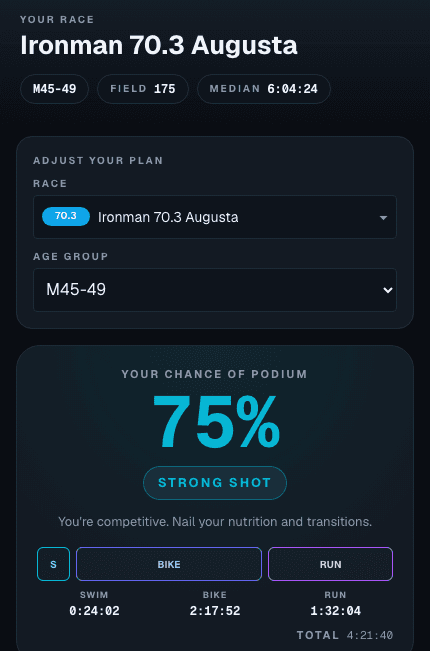
- Read the result: your chance of hitting your Target (with a verdict such as Coin Flip or Strong Shot), your total time, YOUR PLACING (where you would most likely finish), and How you stack up (how each split compares with the field). A strip of field stats shows the field size, the median finish, and the Top 3, Top 5, and Top 10 cutoff times.
- 2
Pressure-test your race-day scenarios
- This is the core of CrushThisCourse: change one decision at a time and watch what it does to the whole race. Drag a slider, or type a time next to it and press Enter.
- What is riding the bike a few minutes faster actually worth? Move Bike down by a few minutes and watch your chance of hitting your Target and YOUR PLACING.
- What if a harder bike costs you on the run? Make Bike a few minutes faster and Run a few minutes slower, by whatever you would realistically lose. CrushThisCourse does not slow your run for you when you ride harder; that call is yours, based on your own training and racing. It shows you whether the trade improves or hurts the overall prediction.
- What mix of realistic splits gives you the best shot at your Target? Try a few combinations and compare the total and the result. When your chance is not already high, a Where to Find Time note points at the split with the most room.
- Change the Target too. The same splits give different odds for a Top 10 than for a podium.
- 3
Settle on a strategy you can actually race
- Keep adjusting until every split is one you believe you can hold on race day, not just the combination that looks best on screen.
- Use How you stack up as a reality check. A split far better than anything you have ever done is a warning sign, not a plan.
- The numbers are probabilities built from real finisher results for that race and age group. They are a decision aid, not a guarantee.
- 4
Optional: build a bike power plan
- If you want a more defensible bike split, build a power plan for your course. From /sim, tap the "Build your bike power plan ->" button in the Bike Power Plan section, between Adjust your plan and the splits. It carries over the race you just picked, so there is nothing to re-enter.
- This step needs a free account, and a free account includes one plan. If you are not signed in yet, you will get a quick sign-up prompt; nothing you already entered gets lost. Unlimited plans need the Athlete plan.
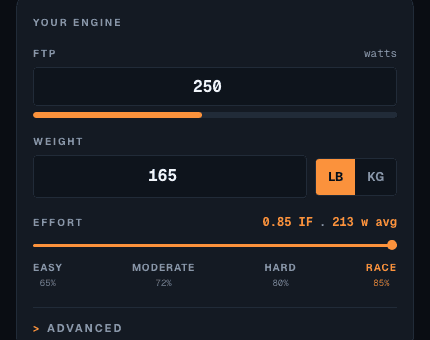
- Under Your Engine, enter your FTP in watts and your Weight (there is an lb/kg toggle next to it).
- Set your Effort on the slider. The four presets are Easy, Moderate, Hard, and Race. Race matches actual race-day pacing, so it is the right choice for a first pass.
- An Advanced section (bike and kit weight, riding position, surface) is there if you want to fine-tune it, but it is optional; the defaults work fine to start.
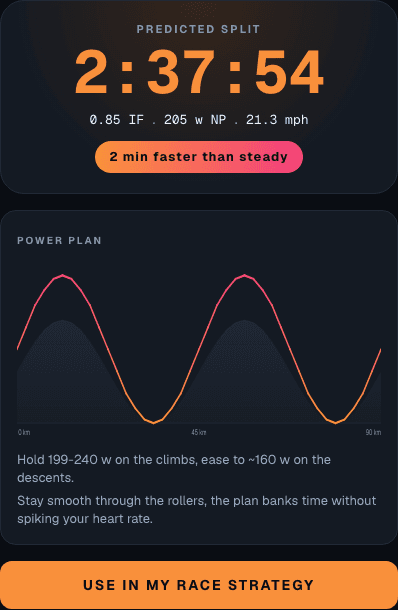
- You get a predicted bike split for that course, plus a Power Plan card: a chart showing the watts to hold on every climb and descent, and a few pacing cues.
- 5
If you built a plan: feed it back into your prediction
- Tap "Use in my race strategy" below the power plan. You land back on /sim with your Bike split replaced by the plan's split. It is handed over in your browser, so do this on the same device.
- Now look at what changed: did your chance of hitting your Target move, and did YOUR PLACING change? That is the answer to whether the plan's bike split helps the whole race.
- If the plan asks more of your legs than your earlier guess, revisit your Run split before you trust the result.
- 6
Save your race strategy
- When you are signed in, a Save button appears below your results. It confirms with "Saved to your strategies". A saved strategy keeps your race, age group, Target, and splits.
- Find it later under Saved Strategies, on the web or in the mobile app with the same account.
- Share Strategy, just below Save, creates a link and a QR code you can hand to your coach or crew. It works even if you are not signed in.
- 7
Optional: export a .fit file
- If you ride with a Garmin or Wahoo head unit, tap "Export .fit" right below your power plan (you need to be signed in) to download a file straight from the web. It is a convenience for executing the plan on the bike. Your race strategy works fine without it.
- The same export is in the CrushThisCourse mobile app too, if you would rather do it from your phone. Scan the QR code at the top of this page, or find CrushThisCourse in the App Store or Google Play, and sign in with the same account.
For coaches
One account, one subscription, on web and mobile.
A Coach subscription can be bought from the web app or the mobile app. Either way it attaches to your account, not the device, so it is active the moment you sign in anywhere.
A coach account can do everything an Athlete account can: build and save your own race strategy and bike power plan. Coach roster and plan-delivery tools are not available yet.